A Table holds structured data you query, sum, or compute over — a list of contacts, expenses, inventory, or a content calendar. Tables are separate from the Board: the Board tracks work with an owner and a status, and a Table holds the records behind that work.
Where to find it
Tables live in the Docs area, next to your sources and competitors.
- In the sidebar, click Docs.
- Click the Tables tab.
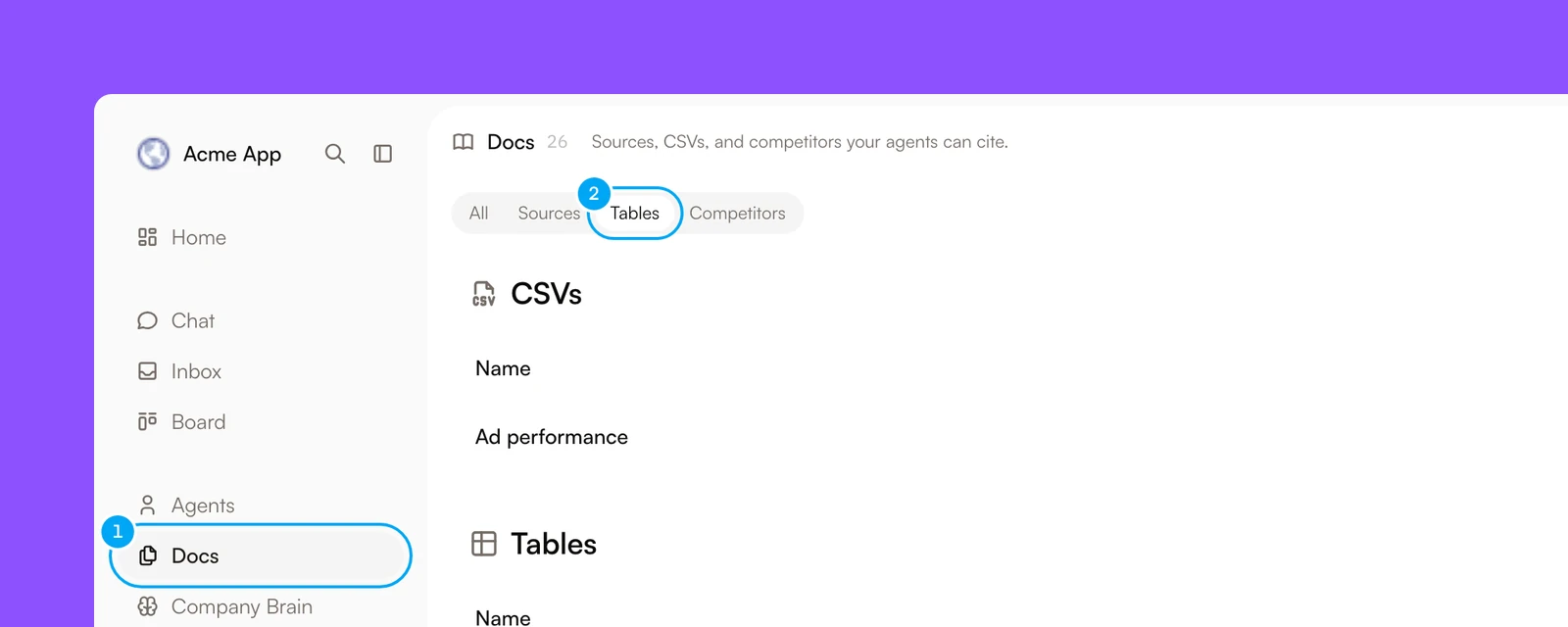
Click a table to open it beside the list. The side view has a Records tab for the rows and a Schema tab that draws the table and the tables it links to. Expand opens the full page. There, Add field adds a field, Add record adds a row, and Sources manages scheduled sources.
There is no New table button. Create a table in one of two ways:
- Ask an agent in chat to create it. See Working with a Table from chat.
- On the Docs page, click Add source, choose Upload file, and drop in a
.csvfile. The Import CSV dialog shows the columns it found, so you can check them and name the table before it is created.
Table structure
A Table is made of rows and fields, which show as columns in the grid. When you add a field, you choose its type:
- Text, Number, Checkbox, Date & time, URL, Email, Phone, Currency, and Rating hold a single value;
- Select and Multi select hold a choice from a fixed set of options;
- Relation links a row to a row in another Table. Link type is Single record or Multiple records. AI Agent adds the matching field on the other Table for you;
- Lookup (computed) pulls a field from the record that a Relation links to;
- Rollup (computed) aggregates the records that link to a row from another Table, with Count, Sum, Average, Minimum, Maximum, Any (at least one true), or Every (all true). Sum, Average, Minimum, and Maximum work on Number, Currency, or Rating fields. Any and Every work on Checkbox fields;
- Formula (computed) calculates a value from other fields in the same row;
- Agent (computed) asks an agent to fill the cell. Agent fields spend credits, and Run column asks you to confirm a large run before it starts.
Relations let you build a small related schema — for example, Companies and Deals, where each Deal links to a Company. A Rollup field on Company, set in Linked from to the Deals that link to it, sums a number field, such as the value of each Deal, across those Deals. A Rollup uses every linked record. It has no setting to include only some of them, so it cannot total only the open Deals.
Views, filters, and sorts
In the full page, use Search records… to find rows. Click New view to filter and sort: Add condition filters rows, Add sort orders them, and Save view keeps the combination under the name you give it. All records shows every row. The grid loads the first 2,000 rows, and search, sort, and filters apply to those rows.
Working with a Table from chat
Ask an agent in chat to create a Table, add fields, or write rows, and it returns a draft card. A table draft shows the table name and its fields, and you confirm it with Create table. A draft that adds fields to an existing table reads Add columns to the table name, and you confirm it with Add columns. A row write shows the target table, a badge for the kind of write, and a preview of the rows, and you confirm it with Write N rows. One write holds at most 200 rows. Nothing is created or written until you confirm — the same confirm-before-it-lands pattern as a ticket drafted from chat.
An agent can also read an existing Table directly — filtering, sorting, or computing an aggregate like a total or an average — without a confirmation step, because a read changes nothing. Table tools are always available in chat. They do not depend on the agent’s connection tool access.
Keeping a Table filled automatically
A Table can stay filled by a scheduled source instead of manual entry or one-off chat writes. A source runs an Apify actor on a schedule and writes the results into the Table.
- Open the Table on its full page, and click Sources.
- In Scheduled sources, click Add source.
- In Add scheduled source, enter a Name and the Actor ID, then choose the Cadence.
- Under Advanced, set Actor input and Mapping. The mapping tells AI Agent which parts of the actor’s results go into which fields.
- Click Create source.
The source runs on your Apify connection, so connect Apify first. The cadence runs in UTC, with the presets Every hour, Every day at 09:00 UTC, and Every Monday at 09:00 UTC, or Custom. A source runs at most once an hour, a workspace can have 10 active sources, and one run adds at most 2,000 rows. A source pauses itself after 3 failed runs in a row, and you can pause it yourself. The last run and recent history show in Scheduled sources.