A trigger decides when a workflow or Autopilot starts. Every trigger enters the same run model, so run history and approvals behave the same way whichever trigger you choose. Some triggers need a higher plan. Read plans, credits, and usage for the limits.
Trigger kinds
| Trigger in the list | Starts when | Typical use |
|---|---|---|
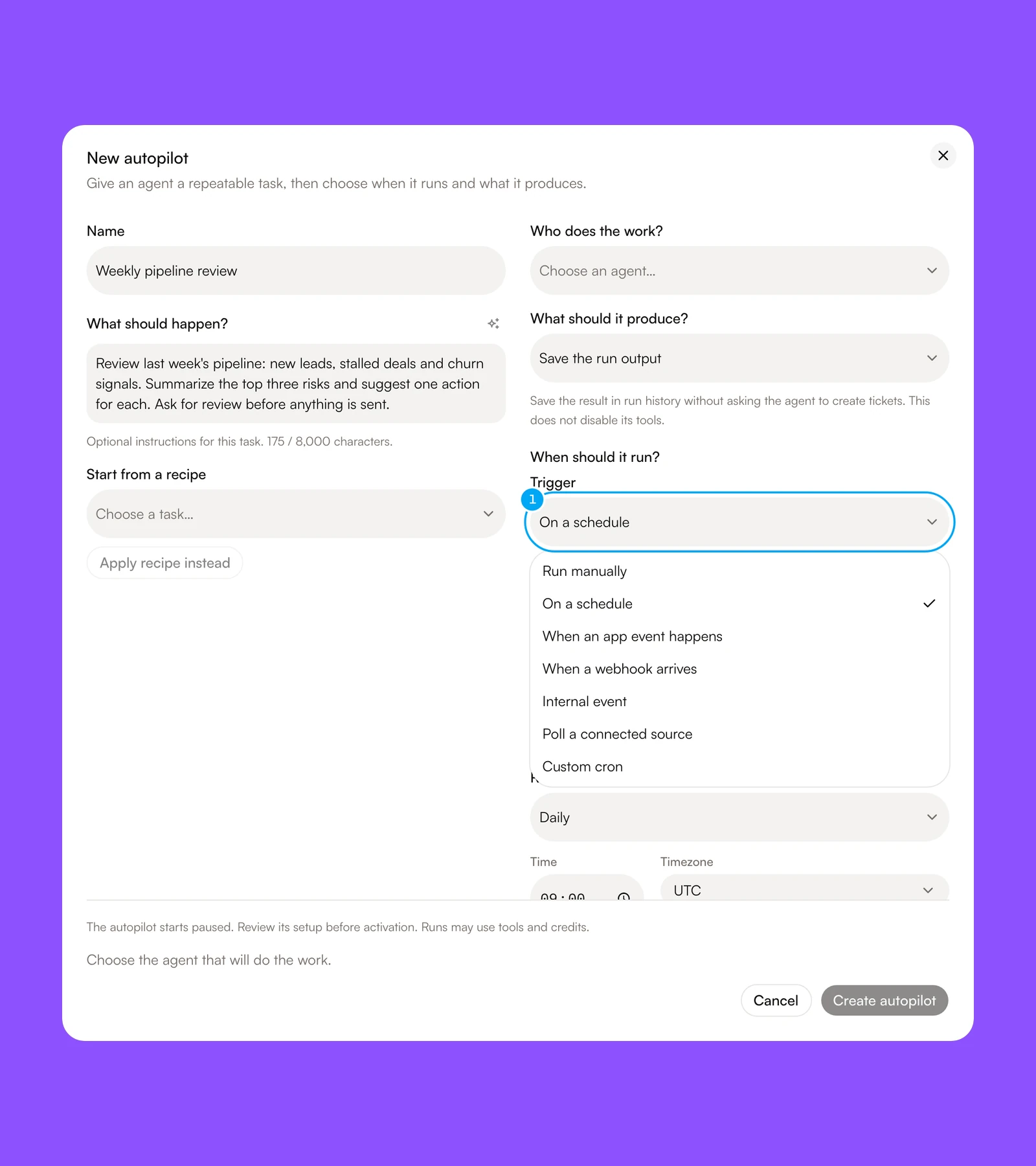
| Run manually | You start the run: the Run tab in the builder, or Run now on an Autopilot | Testing a new process |
| On a schedule | The Repeat setting (Hourly, Daily, Weekdays, Weekly, Monthly, or Yearly) matches in the timezone you choose | Weekly reviews, daily digests |
| When an app event happens | A connected app fires an event. Pick the connection and the event, then fill in the event’s settings. The workflow receives the provider object under input.payload. |
Reacting to work in another product |
| When a webhook arrives | An external system sends an HTTP POST to the workflow’s URL |
Form submissions, CRM automations, custom code |
| Internal event (advanced) | A workspace event fires: a ticket is decided, brand enrichment completes, an inbox or chat channel receives a message, a monitored competitor page changes, or a table row is created, updated, or deleted | Reacting to work inside AI Agent |
| Poll a connected source (advanced) | A connected app is checked every N minutes (5 minimum, up to 7 days). One run starts per new item, or one run per batch. Turning the trigger on remembers what already exists, so only items that arrive afterwards start runs. | Google Sheets: new rows, and similar “watch a list” sources |
| Custom cron (advanced) | A cron expression you write matches in the timezone you choose | Schedules the presets cannot express |
The advanced triggers stay hidden until you click Show advanced triggers next to the Trigger list.
Choose a trigger
- In Trigger, open the list and choose how the Autopilot starts. Click Show advanced triggers first to add Internal event, Poll a connected source, and Custom cron to the list.
A trigger only fires while the workflow is live. In the builder, the header shows Trigger live or Trigger paused. An Autopilot shows Active or Paused. Editing a trigger saves a draft (Trigger draft saved) that you publish before it takes effect. Setting a workflow’s trigger live can open the Allow these writes? dialog, which Approvals explains.
Only run when. An event trigger can carry a filter such as input.source == 'human'. The workflow runs only when the filter is true for the event. Table-row triggers can also be limited to one table with Table. The event payload carries ids and metadata, not the row’s values. To test a row’s field, add a Tool step that reads the table and a Condition after the trigger.
Poll limits. A poll trigger starts at most 500 runs per UTC day, then the workflow or Autopilot pauses itself. Each poll starts runs for at most 25 new items, and the rest run on the next poll. The workflow also pauses itself after 10 failed reads in a row.
Google Sheets: new rows. Choose Poll a connected source, pick the Account and the read action, and set Poll timing (once a week is fine for a digest). The sheet needs a column that uniquely identifies each row, such as an id or a timestamp. Set Items path and Dedupe so the trigger can tell new rows from ones it already saw. Under Run, choose one run per item, which puts each new row under input.item, or one run per batch, which puts every new row under input.items.
Plan limits
Event, webhook, and app-event triggers need the Pro plan or higher. Schedule, poll, and custom cron triggers count against your plan’s scheduled-job limit, and your plan sets how often they may run. A trigger that breaks a limit cannot go live. The limits for each plan are in plans, credits, and usage.
Webhook requests
Each webhook-triggered workflow has its own URL. Copy it from the Start block.
- Method:
POST. - Body: any text up to 1 MB. When the
Content-Typeis JSON, the body is parsed and exposed to the workflow as its input; otherwise the raw text is exposed. - Delivery id: when you authenticate with a token, send an
Idempotency-Key,Webhook-Id,X-Webhook-Delivery-Id,X-Delivery-Id, orX-Request-Idheader to make retries safe. Without one, a token-only sender’s identical body counts as a duplicate for about 2 minutes: the id is the SHA-256 of the body plus a 2-minute time bucket. A request that carries a valid signature always uses the plain SHA-256 of the body. A token-only request without a delivery header uses the 2-minute bucket. - Limit: 60 requests per minute per webhook and sender address. Above that you receive
429with aRetry-Afterheader.
Responses
| Status | Body | Meaning |
|---|---|---|
200 |
{ "ok": true, "status": "queued", "deliveryId": "…" } |
Accepted; a run starts shortly. |
200 |
{ "ok": true, "status": "duplicate", "deliveryId": "…" } |
Same delivery id already accepted; no new run. |
200 |
{ ok, status: "stopped", reason, deliveryId } |
Sync mode: the run stopped before it finished; reason says why. |
202 |
{ ok, status: "suspended", deliveryId } |
Sync mode: the run is waiting for a person. |
401 |
Unauthorized |
No valid token or signature. |
404 |
Workflow webhook not found |
Unknown, archived, or non-webhook workflow. |
408 |
{ ok, status: "timeout", deliveryId } |
Sync mode: the run did not answer in time (or did not start); if it is running, it keeps running. |
413 |
Payload too large |
Body over 1 MB. |
429 |
Too Many Requests |
Rate limit reached. |
500 |
{ ok: false, status: "failed", deliveryId } |
Sync mode: the run failed. |
The response never includes a run id, except in sync mode below. Open the workflow’s run history to follow the run.
The delivery-id dedupe above only catches an identical retry. If the same real-world event can arrive under a different delivery id — no stable Idempotency-Key from the sender, or a re-send with a new one — add an Only once step after the trigger and key it on a field from the body, such as an order id. It remembers that key for the window you set and skips or flags the repeat.
Wait for the result
Add ?mode=sync to the webhook URL to wait for the workflow’s answer in the same request. The workflow replies through a Respond to webhook block (JSON, raw text, or a redirect, with a status code and headers of your choice). Without that block, a finished run returns 200 with status: "completed" and the workflow’s final output when it defines one. The output is returned as output, or flagged outputTruncated when it is larger than 256 KB. The wait is limited to 25 seconds by default; a slower run returns 408 with status: "timeout" and the same deliveryId, and keeps running — find it in run history. A run waiting for approval returns 202 with status: "suspended". A failed run returns 500 with status: "failed". Every reply carries the X-Webhook-Delivery-Id header.
Choose Respond and stop to end the run after replying, or Respond and continue to reply and keep working. Only requests sent with ?mode=sync receive the reply; others get the usual queued receipt. A sync request also gets the plain queued receipt when too many sync requests are already waiting.
Authenticate a webhook
A request is accepted when it carries either a valid token or a valid signature. Requests with neither are rejected before the body is read.
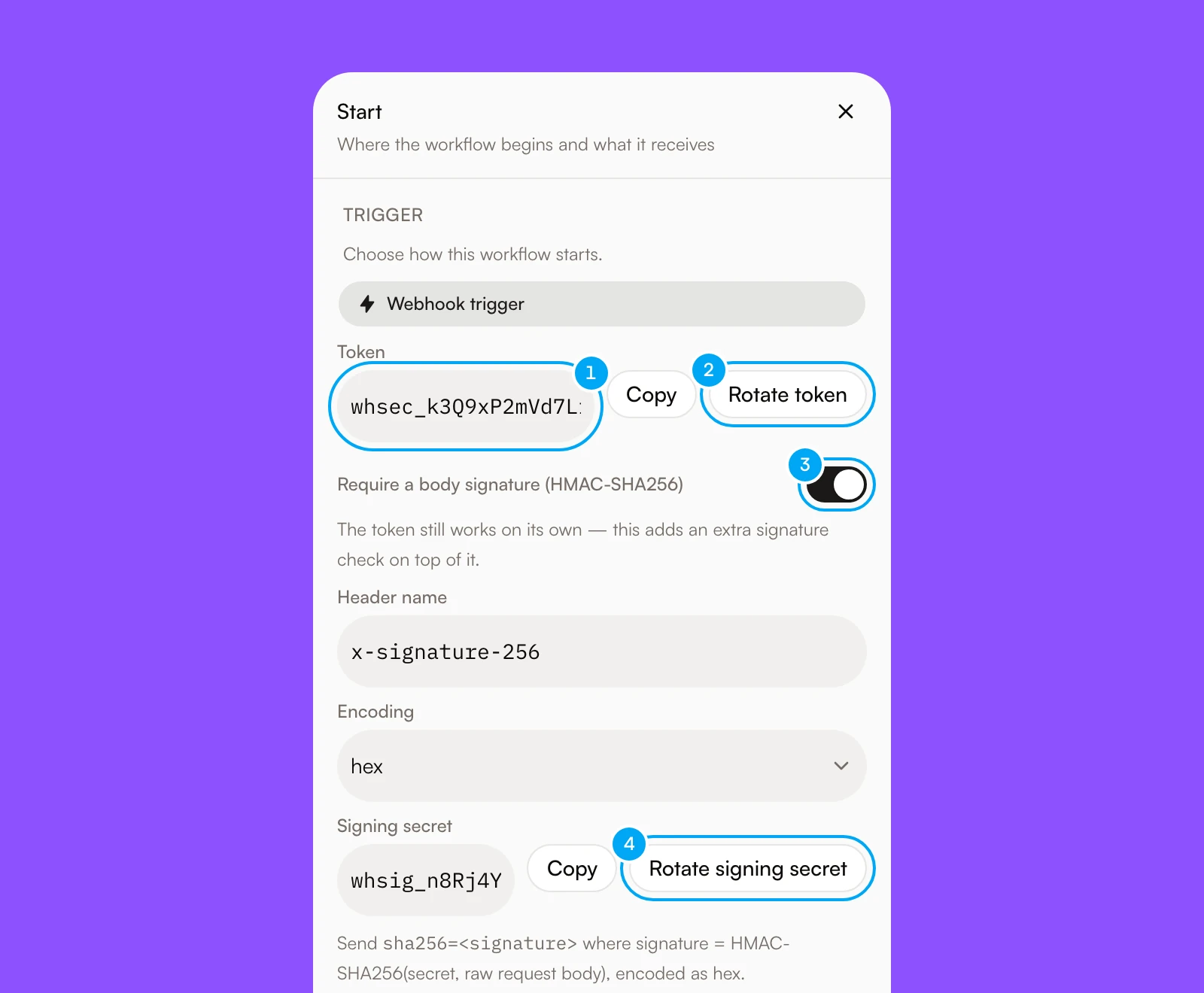
- The token. Send it with
Authorization: Bearer <token>orX-Webhook-Token. - Rotate token generates a new token. The old one keeps working for 24 hours unless you revoke it.
- Require a body signature adds the signing secret and the header and encoding settings below it.
- Rotate signing secret generates a new signing secret.
Every webhook trigger has a token that starts with whsec_. Send it in one of two headers:
Authorization: Bearer <token>X-Webhook-Token: <token>
Use the token with tools that let you add a fixed header, such as Zapier or Make.
Turn on Require a body signature in the Start block to get a signing secret that starts with whsig_. The sender computes an HMAC-SHA256 of the exact request body with that secret and sends it in the header you choose. The default header is X-Signature-256 and the default encoding is hex. Choose base64 for services that send base64 signatures.
The header value may start with sha256=. Both forms are accepted:
X-Signature-256: sha256=f7bc83f4…X-Signature-256: f7bc83f4…
Node.js example:
import { createHmac } from "node:crypto"

const body = JSON.stringify({ email: "[email protected]" })
const signature = createHmac("sha256", process.env.WEBHOOK_SIGNING_SECRET)
	.update(body)
	.digest("hex")

await fetch(WEBHOOK_URL, {
	method: "POST",
	headers: {
		"content-type": "application/json",
		"x-signature-256": `sha256=${signature}`,
	},
	body,
})
Shell example:
BODY='{"email":"[email protected]"}'
SIG=$(printf '%s' "$BODY" | openssl dgst -sha256 -hmac "$WEBHOOK_SIGNING_SECRET" | awk '{print $NF}')
curl -X POST "$WEBHOOK_URL" \
  -H "content-type: application/json" \
  -H "x-signature-256: sha256=$SIG" \
  --data "$BODY"
Sample data
AI Agent keeps the last five payloads a webhook, app-event or polling trigger received. Open the Start block to see them, pin one, and click Use fields to add its fields to the input contract so you can pick them in any step. Catch a test event waits two minutes for the next payload; for a polling trigger it fetches the current items right away. A step test and Run with sample use the pinned sample as the workflow input. Long values are shortened to keep a sample under 16 KB.

- Catch a test event waits for the next payload.
- Use fields adds the fields of that payload to the input contract. Pin or Unpin chooses the sample that tests and Run with sample use.
Resume a waiting run
A step that waits for a URL can suspend a run until an external caller sends POST to the run’s own resume URL. Present the resume token one of three ways, checked in this order: Authorization: Bearer <token>, an X-Resume-Token header, or ?token= on the URL. Prefer a header — a query-string token is more likely to end up logged somewhere.
The route responds 202 on a successful resume, 401 on a missing or invalid token, 404 when the run is not found, 409 when the run is not currently waiting there (already resumed, canceled, or never suspended), 413 when the body is too large, and 429 above 30 requests per minute from one address.
Rotate a credential
Rotate in the Start block
Choose Rotate token or Rotate signing secret. A new value is generated immediately.
Update the sender
Paste the new value into the external system. The previous value keeps working for 24 hours so the change does not drop deliveries.
Revoke immediately when needed
If a credential leaked, tick Revoke the current token immediately (or secret, when you rotate the signing secret) in the rotation dialog. The previous value stops working at once.
Verify
Send one test request with the new value and confirm a queued response and
a new run in run history.
Every rotation is recorded in the audit log without the secret values. The Audit Log page is part of the Activity feature in Labs. Turn it on with Show Labs features in Settings → Labs.
Fix a rejected request
Check that the header is Authorization: Bearer <token> or X-Webhook-Token, that the token starts with whsec_, and that it was not rotated more than 24 hours ago.
Confirm signing is enabled on the trigger, the header name matches the trigger setting, the encoding (hex or base64) matches, and the signature was computed over the exact bytes sent.
The delivery id was seen before. Send a new Idempotency-Key for each distinct event. A sender that authenticates with a signature alone is matched on the body, so a changed body counts as a new event.
The workflow is archived, the URL is wrong, or the trigger is no longer a webhook. Copy the URL again from the Start block.